
Breaking Down Silos Through a Collaborative Design System in Figma
Breaking Down Silos Through a Collaborative Design System in Figma
How we Implemented a scalable design system in Figma that accelerated delivery, strengthened cross-team collaboration, increased task completion rates by 50%, cut duplicative code by 40%, and lowered front-end error rates by 30%
50%
Increased Task Completions
30%
Front-end error reduction
40%
Less duplicative code
50%
Increased Task Completions
30%
Front-end error reduction
40%
Less duplicative code
CLIENT
Government Agency
Government Agency
PROJECT TYPE
Design System Enhancement
Design System Enhancement
TIMELINE
5 months
5 months
ROLE
Ops and Tooling Focus Area Lead
Ops and Tooling Focus Area Lead
DESIGN TOOLS
Axure, Figma, Storybook, Mural,
Notion, ChatGPT
Axure, Figma, Storybook, Mural,
Notion, ChatGPT
STRATEGY
Project Management
UX Strategy
Accessibility
UX Outcomes
Research
PROJECT OVERVIEW
PROJECT OVERVIEW
When I joined the team, design efforts were siloed in Axure–isolated from actual frontend architecture and too slow to keep pace with the team’s rapid release cycle. There was no single source of truth, and both developers and designers were hindered by documentation that was either too minimal to guide or too dense to be actionable. All the while, developers needed to move quickly to support products processing 85% of all U.S. immigration and asylum cases, impacting upwards of 8 million people annually.
THE CHALLENGE
THE CHALLENGE
Axure didn’t map to frontend code, and the design system lacked clear documentation. Teams operated in silos, and developers were often left to make design decisions without UX input, which increased technical and UX debt. An ideal tool for scaling design systems and supporting real-time collaboration for seamless developer handoff was needed.
THE PROBLEM STATEMENT
THE PROBLEM STATEMENT
As a designer, I would like a centralized and collaborative design system environment so my team can maintain consistent components, streamline developer handoffs, and scale the design system efficiently.
"Implementation is slowed down due to the fact that developers are left to make design assumptions"
"Implementation is slowed down due to the fact that developers are left to make design assumptions"
Lead Developer
THE OUTCOME
Implementing a centralized design system enabled teams to design and build more efficiently by standardizing components and patterns which strengthened collaboration between developer and design teams. This resulted streamlined development handoffs across product lines and a future-ready foundation that supports scalable growth, continued development, enhanced team confidence, and improved productivity.

A centralized Figma design system driving consistency and speed—shown here are a few of the core UI elements.

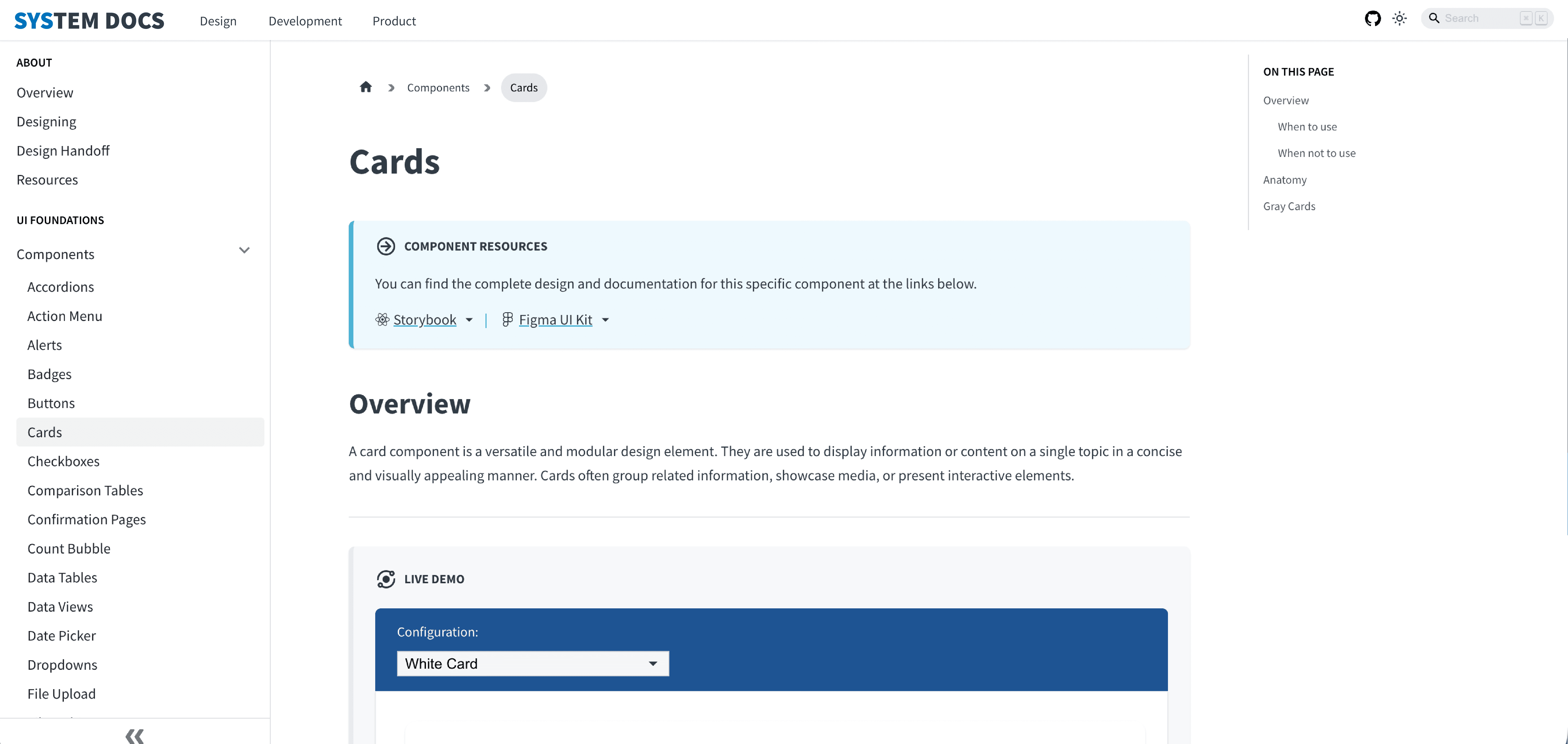
A unified documentation platform aligning designers and developers around a single source of truth to ensure consistency and scalability.
Developer Experience
Having a single source of truth in Figma means fewer back-and-forths with design. The specs are clear, and the components translate smoothly into code.
-Senior Frontend Developer
ADOPTION RESULTS
+50%
Increased Task Completions
Reduced UI consistencies
across products
-30%
Reduced front-end implementation errors
Reduced custom code and the need to build UI elements from scratch
-40%
Less duplicative code
Created Single Source of Truth, Reduced feature specific UI rebuilds
+100%
Adoption Success
Complete integration across design
and development teams
The implementation of a centralized design system offered an extremely valuable opportunity for our team to learn Figma and all it had to offer. Adoption drove significant measurable improvements across performance, efficiency and development.
WHY IT WORKED
Involved all stakeholders early on, ensuring cross-team alignment.
Built confidence by addressing concerns with practical demonstrations
Conquered the learning curve by embedding the design system into day-to-day tasks.
Developed an efficient QA migration workflow.
Created a source of truth by building living documentation into Figma, improving developer handoff.
Fostered a culture of positive morale.
THE PROCESS: Our Three Phased Strategy That Guided the Transformation
We introduced a structured migration framework that combined research, cross-functional collaboration, and phased implementation to transition the design system from Axure to Figma and enable long-term scalability and adoption.
Audit the Existing
System
Led a month-long audit workshop with designers and engineers to assess the legacy Axure design system, identifying deprecated components, inconsistent patterns, and redundant assets to ensure only scalable, reusable elements were migrated to Figma.
What We Found
Inconsistent styling
Many undocumented patterns
Assess the Existing
Documentation
Evaluated the existing guidance, component standards, and usage patterns to determine what was still valid.
What We Found
Outdated and nonexistent documentation, which created gaps for teams transitioning to Figma.
The Strategy That Solved It
Led a documentation review alongside the design system audit.
Identified missing or inconsistent guidance, and collaborated with designers and engineers to rewrite and modernize documentation around Figma components, interaction patterns, and implementation guidelines.
Leveraged AI assisted research to identify industry best practices and inform component guidance and documentation.
Restructured documentation to align with the new design system, making it easier for teams to understand component usage, follow style guidelines, maintain consistency, and successfully adopt the new system.
Drive
Implementation
Facilitated cross-team alignment early with engineering, product, and research leads to provide clear governance and ensure components were feasible, documented, and easy to integrate into development pipelines.
Held weekly Figma workshops and embedded the system into day-to-day workflows.
Provided hands-on guidance
during initial implementation and incorporated feedback through iterative improvements to improve adoption.
What We Found
Increased cross-team collaboration and engagement
Streamlined project handoffs
CONTRAINTS
Limited Resource Allocation and Time
Designers Working in Siloes
Manual Asset Recreation
Tool Learning Curve
Component Structure Differences
Limited Resource Allocation and Time
THE PROCESS: Our Three Phased Strategy That Guided the Transformation
We introduced a structured migration framework that combined research, cross-functional collaboration, and phased implementation to transition the design system from Axure to Figma and enable long-term scalability and adoption.
Audit the Existing
System
Led a month-long audit workshop with designers and engineers to assess the legacy Axure design system, identifying deprecated components, inconsistent patterns, and redundant assets to ensure only scalable, reusable elements were migrated to Figma.
Led a month-long audit workshop with designers and engineers to assess the legacy Axure design system, identifying deprecated components, inconsistent patterns, and redundant assets to ensure only scalable, reusable elements were migrated to Figma.
What We Found
What We Found
Inconsistent styling
Inconsistent styling
Many undocumented patterns
Many undocumented patterns
Assess the Existing
Documentation
Evaluated the existing guidance, component standards, and usage patterns to determine what was still valid.
Evaluated the existing guidance, component standards, and usage patterns to determine what was still valid.
What We Found
What We Found
Outdated and nonexistent documentation, which created gaps
for teams transitioning to Figma.
Outdated and nonexistent documentation, which created gaps for teams transitioning to Figma.
The Strategy That Solved It
The Strategy That Solved It
Restructured documentation to align with the new design system, making it easier for teams to understand component usage, follow style guidelines, maintain consistency, and successfully adopt the new system.
Leveraged AI assisted research to identify industry best practices and inform component guidance and documentation.
Identified missing or inconsistent guidance, and collaborated with designers and engineers to rewrite and modernize documentation around Figma-based components, interaction patterns, and implementation guidelines.
Identified missing or inconsistent guidance, and collaborated with designers and engineers to rewrite and modernize documentation around Figma components, interaction patterns, and implementation guidelines.
Restructured documentation to align with the new design system, making it easier for teams to understand component usage, follow style guidelines, maintain consistency, and successfully adopt the new system.
Leveraged AI assisted research to identify industry best practices and inform component guidance and documentation.
Drive
Implementation
Facilitated cross-team alignment early with engineering, product, and research leads to provide clear governance and ensure components were feasible, documented, and easy to integrate into development pipelines.
Conducted weekly component design peer-reviews and encouraged shared ownership.
Held weekly Figma workshops and embedded the system into day-to-day workflows
Provided hands-on guidance during initial implementation and incorporated feedback through iterative improvements to improve adoption.
What We Found
Increased cross-team
collaboration and engagement
Streamlined developer handoffs
Drive
Implementation
Facilitated cross-team alignment early with engineering, product, and research leads to provide clear governance and ensure components were feasible, documented, and easy to integrate into development pipelines.
Held weekly Figma workshops and embedded the system into day-to-day workflows.
Provided hands-on guidance during initial implementation and incorporated feedback through iterative improvements to improve adoption.
What We Found
Increased cross-team collaboration and engagement
Streamlined developer handoffs
THE OUTCOME
Implementing a centralized design system enabled teams to design and build more efficiently by standardizing components and patterns which strengthened collaboration between developer and design teams. This resulted in streamlined development handoffs across product lines and a future-ready foundation that supports scalable growth, continued development, enhanced team confidence, and improved productivity.

A centralized Figma design system driving consistency and speed—shown here are a few of the core UI elements.
A centralized Figma design system driving consistency and speed—shown here are a few of the core UI elements.
A unified documentation platform aligning designers and developers around a single source of truth to ensure consistency and scalability.
A unified documentation platform aligning designers and developers around a single source of truth to ensure consistency and scalability.
Developer Experience
Having a single source of truth in Figma means fewer back-and-forths with design. The specs are clear, and the components translate smoothly into code.
-Senior Frontend Developer
ADOPTION RESULTS
+50%
Increased Task Completions
Reduced UI consistencies
across products
-30%
Reduced front-end implementation errors
Reduced custom code and the need to
build UI elements from scratch
-40%
Less duplicative code
Created Single Source of Truth,
Reduced feature specific UI rebuilds
+100%
Adoption Success
Complete integration across design
and development teams
The implementation of a centralized design system offered an extremely valuable opportunity for our team to learn Figma and all it had to offer. Adoption drove significant measurable improvements across performance, efficiency and development.
+50%
Increased Task Completions
Reduced UI consistencies
across products
-30%
Reduced front-end implementation errors
Reduced custom code and the need to
build UI elements from scratch
-40%
Less duplicative code
Created Single Source of Truth,
Reduced feature specific UI rebuilds
+100%
Adoption Success
Complete integration across design
and development teams
WHY IT WORKED
Involved all stakeholders early on, ensuring cross-team alignment.
Built confidence by addressing concerns with practical demonstrations.
Conquered the learning curve by embedding the design system into day-to-day tasks.
Developed an efficient QA migration workflow.
Created a source of truth by building living documentation into Figma, improving developer handoff.
Fostered a culture of positive morale.
Developer Experience
Having a single source of truth in Figma means fewer back-and-forths with design. The specs are clear, and the components translate smoothly into code.
-Senior Frontend Developer
WHY IT WORKED
Involved all stakeholders early on, ensuring cross-team alignment.
Built confidence by addressing concerns with practical demonstrations
Conquered the learning curve by embedding the design system into day-to-day tasks.
Developed an efficient QA migration workflow.
Created a source of truth by building living documentation into Figma, improving developer handoff.
Fostered a culture of positive morale.